Audio to text transcription
Upload a recording or paste a link, and in a few minutes you have an accurate transcript with timestamps and speakers, in any of 98 languages, detected automatically.
Gaston at a glance
- Languages
- 98, the language is detected automatically
- Audio
- MP3, WAV, M4A, AAC, FLAC, OGG, OPUS, AMR
- Video
- MP4, MOV, MKV, WEBM, AVI, WMV, MPEG
- File size
- up to 5 GB
- Source
- a file from your computer or a link (YouTube and other sites)
- Output
- sentences with timestamps and speakers
- Export
- TXT, TXT with timestamps, SRT subtitles, CSV
- Translation
- into 43 languages
- Processing
- our own servers in Bratislava, EU
- Price
- 1 free file every day, PRO from €4 a week
How to convert audio to text
-
1
Upload a file or paste a link
Drop a recording into the window or paste a link to a video on YouTube or another site. You don't need to pick the language, we detect it.
-
2
Gaston transcribes it
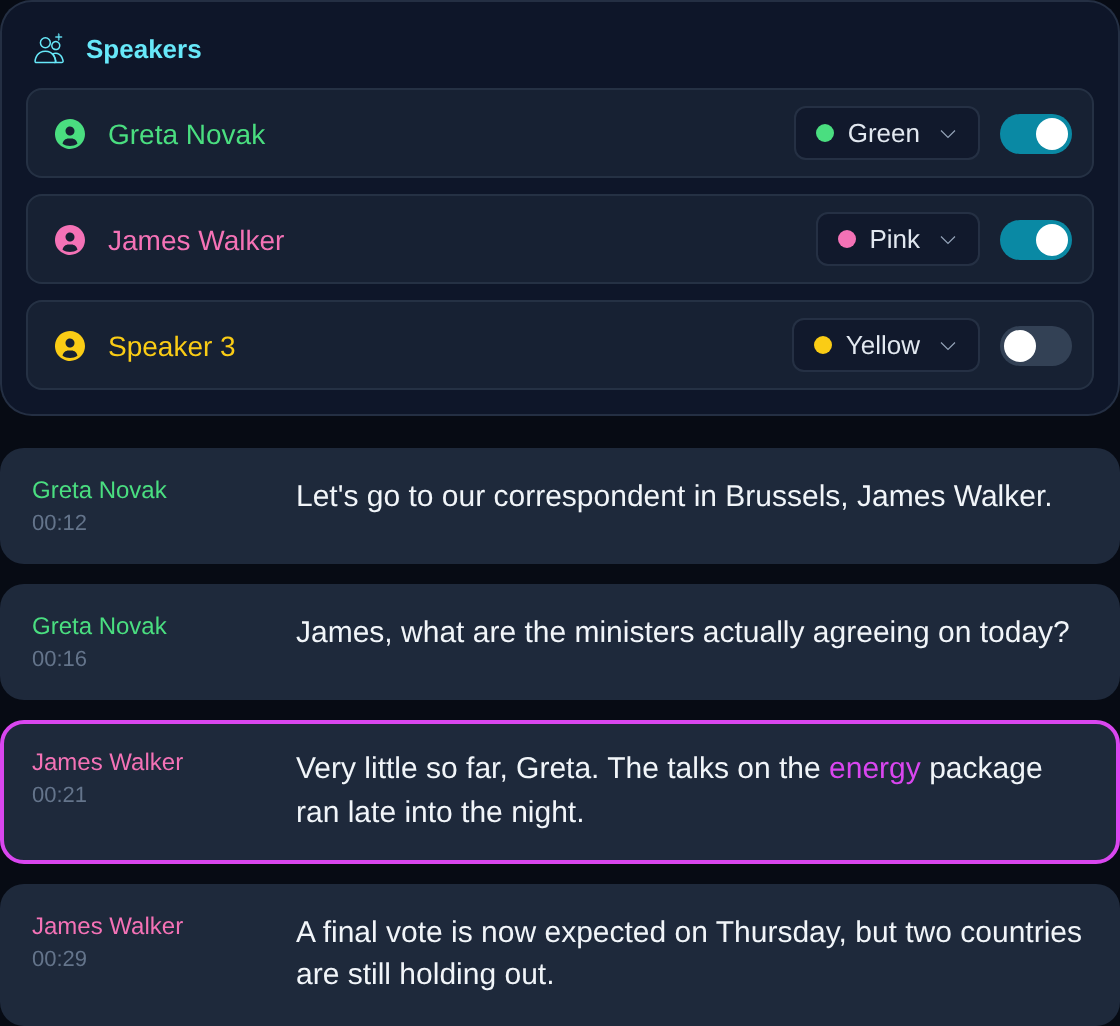
The transcript is usually ready in a few minutes. The text is split into sentences with timestamps, and each sentence belongs to a speaker.
-
3
Read, correct, export
Click a sentence to play the recording from that exact moment. Fix what you need and download the text, subtitles or a spreadsheet.
Our own models where general ones struggle
General speech models are weaker in smaller languages. For Slovak we trained our own model, gaston-sk-v2, on about 2,600 hours of Slovak speech, and we train models for Amharic and Irish too.
- about half the word errors of OpenAI Whisper large-v3 on Slovak
- keeps the names and surnames other models drop
- standard written Slovak with proper diacritics
What to do with the transcript
Search all your recordings
Find a sentence, a name or a topic across your whole library and jump to the moment it was said.
Summaries and questions to AI
Get a summary of a recording or ask about its content without listening to the whole hour.
Translation into 43 languages
Translate a transcript in one click and read the original and the translation side by side.
Subtitles for your video
Export SRT subtitles with exact timestamps and add them to your video.
What people transcribe
Interviews and reporting
Quotes with exact timestamps, no typing by hand.
Lectures and seminars
Notes from the whole lecture that you can search.
Podcasts and videos
Subtitles, show notes and web copy from one recording.
Meetings and calls
Who said what, with a summary.
Frequently asked questions
Is audio to text transcription free?
Yes. You can transcribe one file every day for free, and after signing up you get 7 days of PRO for free, no credit card needed. The free plan exports recordings up to 30 minutes long. PRO costs €4 a week, €9 a month or €99 a year and has no limits.
How accurate is the transcription?
On clean speech the model behind Gaston gets 94 to 97 of every 100 words right in the major European languages. For Slovak we use our own model with an average of 93.35% words right on 8 test sets. Background noise and people talking over each other lower the accuracy.
How long does a transcription take?
Usually a few minutes, depending on the length of the recording and the current load. PRO accounts get the maximum transcription speed.
Which file formats do you support?
Audio in MP3, WAV, M4A, AAC, FLAC, OGG, OPUS and AMR, video in MP4, MOV, MKV, WEBM, AVI, WMV and MPEG. A single file can be up to 5 GB.
Does Gaston detect who is speaking?
Yes. It detects speakers automatically and assigns each sentence to its speaker. You can name speakers, give them colors and filter sentences by speaker.
Can I transcribe a YouTube video?
Yes. Paste the link to the video, there is no need to download it. It works with other sites too.
Can I download the transcript as subtitles?
Yes. You can export the transcript as SRT subtitles, plain text, text with timestamps or a CSV spreadsheet.
Where are my recordings processed?
On our own servers in Bratislava, Slovakia, in the EU. Our only external service is ChatGPT by OpenAI, and only when you use summaries and ask the AI about a transcript. We never sell or hand over your recordings.
Try it on your own recording
Signing up takes a minute. The first 7 days of PRO are free.
Try for free